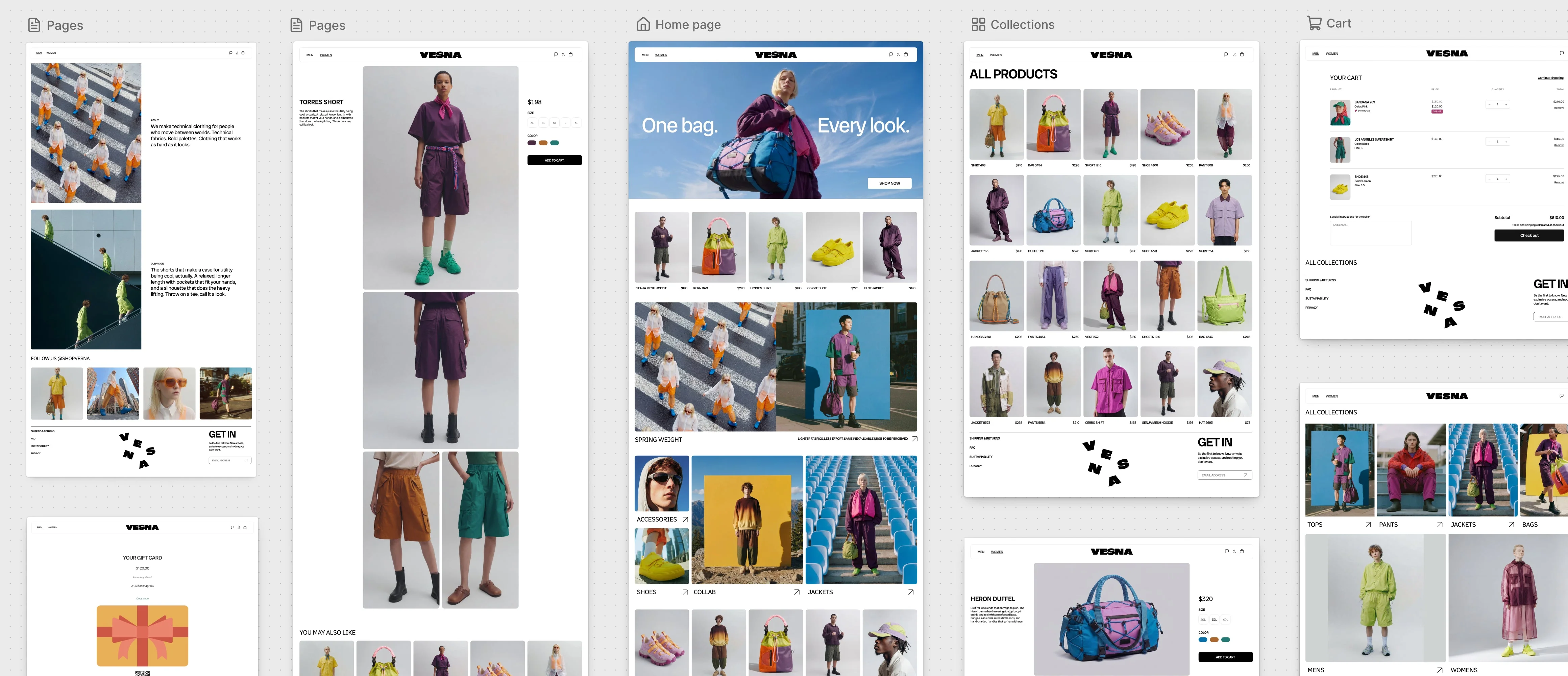
Shopify’s Canvas gives merchants a way to design their store with Sidekick while seeing several pages together. I’m interested in how that could shorten the distance between describing a change and having something useful to review.
There’s also a practical developer question here. Getting a design onto the screen is one part of building a storefront. Keeping it working as products, apps and requirements change matters just as much.
What Canvas does
Canvas is a visual workspace for the online store. You can move between pages, zoom into details and review interactive previews rendered from the store’s code. Sidekick makes changes through a conversation, while you can also edit elements directly.
Shopify says Sidekick now works across theme files, checks its code and inspects screenshots as it builds. That gives it a way to review both the implementation and the visible result. The announcement describes work ranging from individual section edits to wider redesigns. Shopify’s Canvas announcement
The Help Centre adds some useful context. Canvas displays templates side by side, lets you build a theme from a description, and supports trying changes on a copy of a supported theme. Access is currently limited to certain stores, and the workspace is desktop only. Canvas documentation
Seeing the store together could improve design decisions
I think the view across templates is one of the most useful parts.
A homepage can look convincing on its own. Put it beside a collection page and a product page, and you have a better chance of spotting inconsistent spacing, competing heading styles or buttons that feel unrelated.
For example, a clothing store might want large photography and generous spacing. That direction still needs to work on a product page with size options, availability messages and delivery information. Reviewing those pages together could help a merchant refine the design before committing to it.
This could also make feedback more precise. “Make it feel more premium” leaves plenty of room for interpretation. A merchant who can see the result might instead ask for smaller headings, less crowded product cards or more space around the images. Those are changes someone can assess.
A faster first draft has practical value
Canvas could be useful when a merchant knows their products and brand but struggles to translate them into a storefront brief.
An illustrative request might be:
Build a store for a small ceramics brand. Use warm neutral colours and large product photographs. Keep product cards simple, and make dimensions and care instructions easy to find.
Having a working draft to react to could make the next conversation easier. The merchant can judge whether the photography has enough space, whether the navigation makes sense and whether the product information is readable.
I’d expect that to help with early exploration. Whether it saves time across a whole project will depend on how much correction and maintenance the resulting theme needs.
The current limits matter for developers
Shopify’s early-access documentation lists several restrictions. Canvas supports Shopify-developed themes and custom themes, but third-party themes aren’t supported. Themes edited in Canvas don’t receive theme updates, and their files can’t be downloaded.
You also can’t add or configure app blocks or app embeds in Canvas, or customise a theme for different markets. Staff need the theme edit-code permission to open it. Canvas requirements and considerations
The file-download restriction is something I’d check carefully before choosing Canvas for a project with a local development and version-control workflow. App configuration and market-specific requirements could also affect whether it suits a particular store.
A developer reviewing generated work still needs to assess keyboard navigation, mobile layouts, product variants and the behaviour customers depend on. A screenshot can help judge appearance; testing the purchase journey answers different questions.
How I’d approach a first trial
I’d start with a copy of a supported theme and a small brief, such as revising a product layout. That would make it easier to judge the quality of the changes and how much control the merchant has afterwards.
Shopify documents that a duplicated theme becomes a separate copy edited in Canvas. Changes save automatically, but customers see them only after publication. Sidekick changes can be reversed through a further request or by restoring an earlier version from theme history. Creating and customising themes in Canvas
Before publishing, I’d review that layout with a long product title, several images, multiple variants and a sold-out item, then test it on a phone. That’s a useful first measure of whether Canvas has produced something the store can use.
Older: A Developer’s Technical Breakdown of Shopify’s Horizon Theme